Censhare Classic 2026.1 and Censhare Cloud 1.16 are here, and it’s a feature-rich release spanning both platforms. On the Cloud side, highlights include AI-powered video search powered by Comcast Technology Solutions’ VideoAI™, PIM Syndication, and image background removal. Censhare Classic also comes with meaningful additions, including cold storage archiving on AWS Glacier, an intuitive image comparison overlay, recent search history, and new marker shapes, as well as a broad set of platform improvements, accessibility upgrades, and UX refinements shared across both.
Censhare Cloud 1.16 Highlights
PIM Syndication
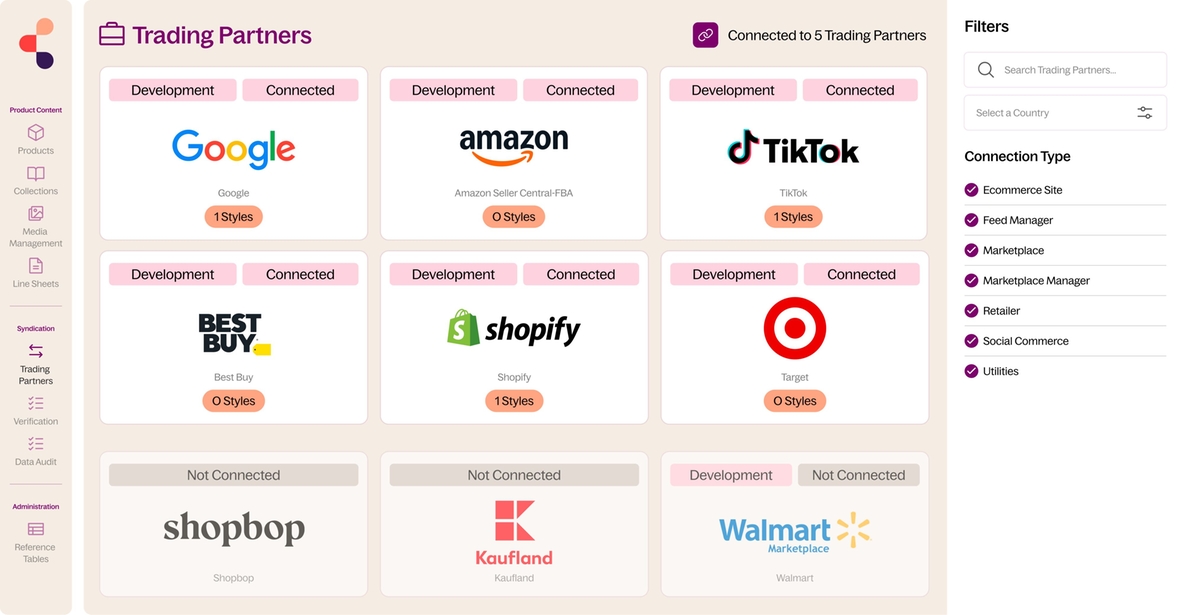
Censhare PIM now delivers powerful product content syndication, automating the distribution of accurate, channel-ready data to over 200 retail endpoints, including Walmart, Shopify, and Google. Syndication eliminates the need for manual product data formatting and submission, speeding up product launches and ensuring your product information is always consistent, compliant, and up to date everywhere it needs to be. Powered by Syndic8, it maps your data and logic automatically, so you can say goodbye to repetitive exports and focus on what matters.
AI-Powered Video Search
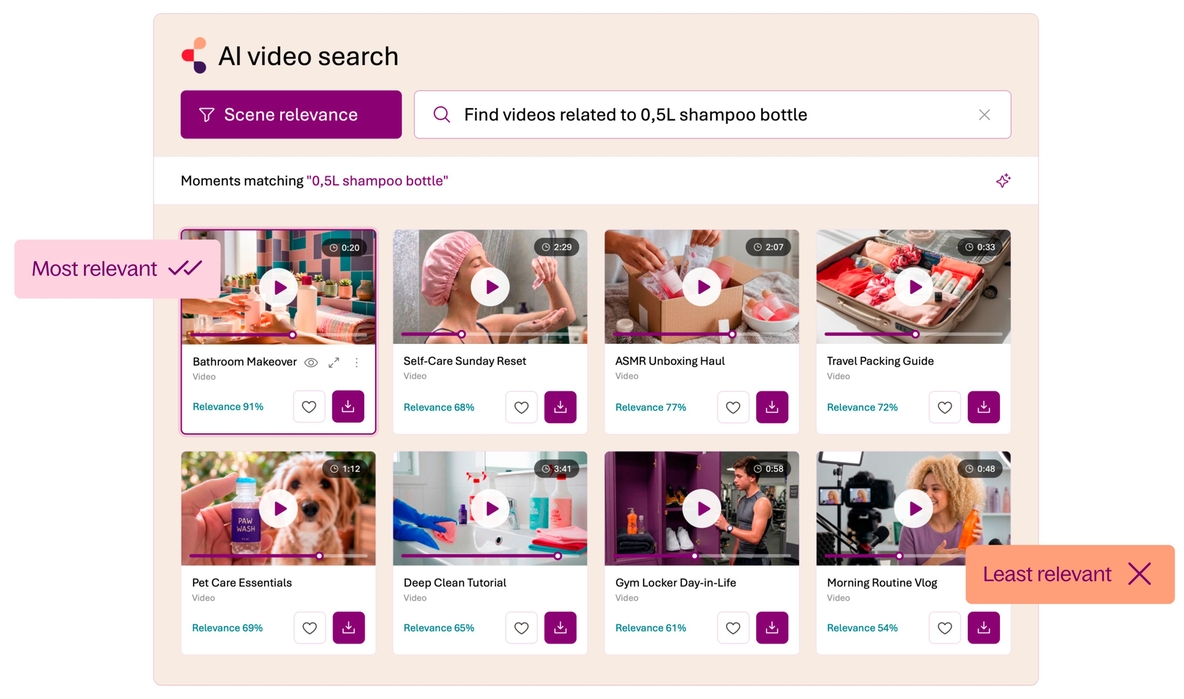
Censhare integrates Comcast Technology Solutions' Emmy Award-winning VideoAI™ to transform the way organizations search for and manage their video assets. Powered by multimodal AI, it goes beyond keyword search to let users find video content based on concepts, emotions, and visual context. This means less time spent searching and the ability to find not just the right video asset, but the right moment within it.
Image Background Removal
With a couple of clicks, Censhare's AI-powered background removal instantly transforms any image into a clean, transparent, production-ready asset. No external tools, no manual masking, just fast, precise results that are automatically saved back into your asset library. It's the creative shortcut your team has been waiting for.
Censhare Classic 2026.1 Highlights
Cold Storage (AWS Glacier)
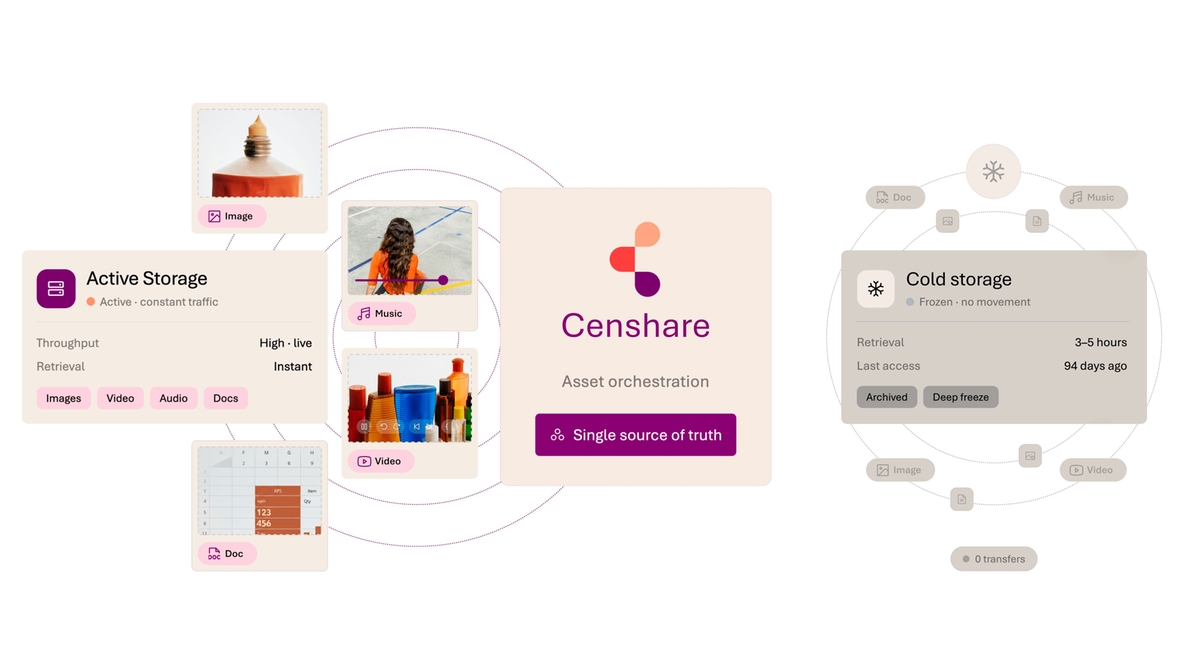
Cold storage enables Censhare customers running on AWS to securely archive large volumes of infrequently accessed assets at significantly lower cost than standard storage. A common use case is archiving finalized campaign assets or legacy media files that must be retained for compliance or future reference but are rarely needed in day-to-day workflows. This release introduces the foundational capabilities for AWS Glacier integration, laying the groundwork for scalable, cost-efficient long-term asset archiving in Censhare.
Overlay UI Control for Image Comparison
Compare two image versions in a single, intuitive view using an adjustable overlay. A vertical slider controls the visibility between the two versions, making it easier than ever to spot even the most subtle changes without switching between windows.
Recent Search History
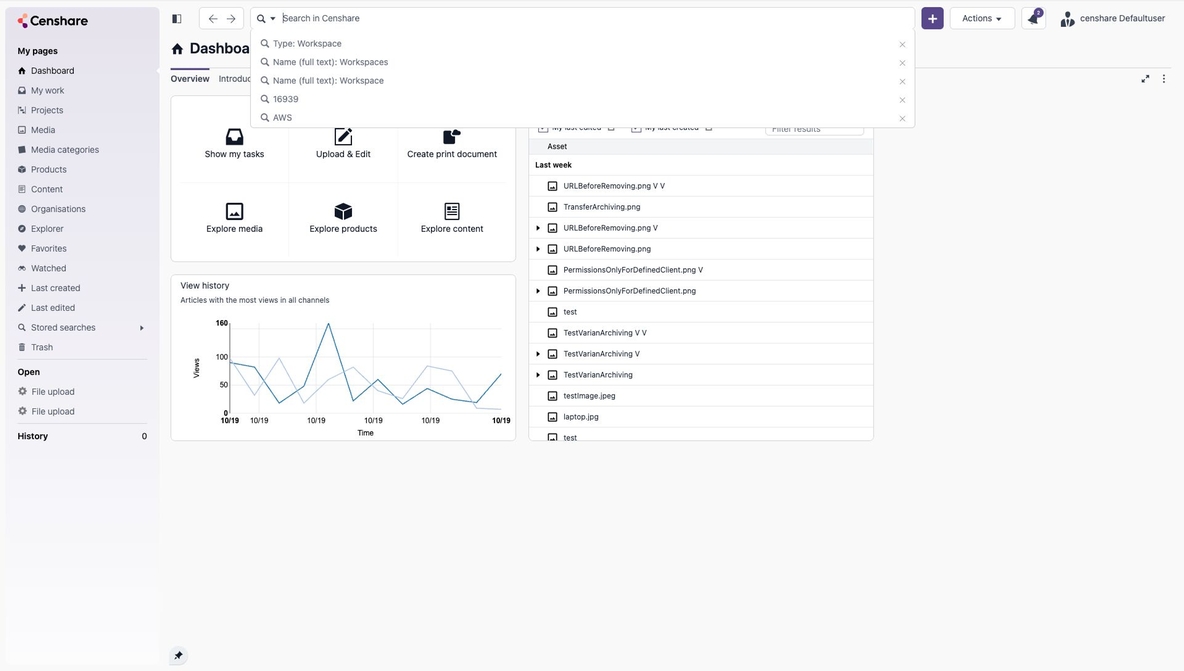
Users can now access their most recent search terms directly from the web client Search bar. When you click the search field, previous searches appear in a dropdown, enabling faster access to frequently used queries and reducing repetitive typing.
New Marker Shapes
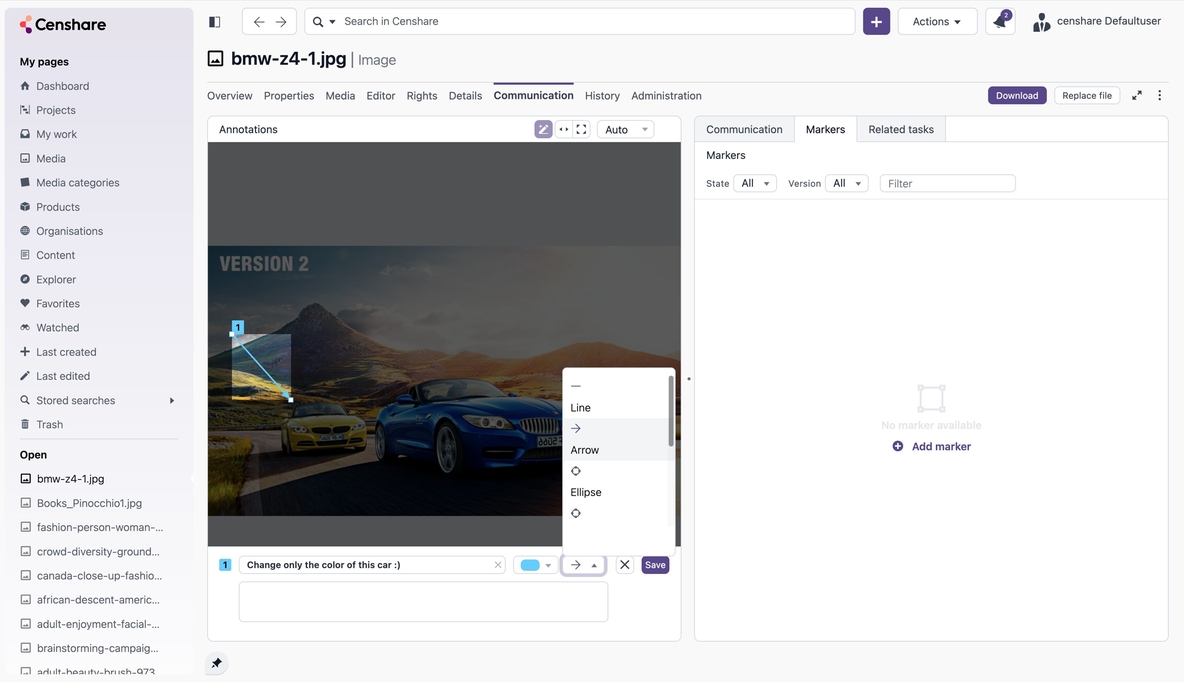
In addition to the standard rectangular marker, users can now choose from arrows, circles, lines, and other shapes when annotating assets. This makes it easier to precisely highlight areas of interest or clearly communicate what needs to be changed.
Other Censhare Cloud Release Items
Node-RED Instance Dashboard: Traffic Lights & Live Status
The Node-RED instance list in the Cockpit now shows a live traffic-light status indicator for every pod: green for running, amber for restarting, red for error or Git conflict, and grey for stopped. Clicking on a non-green status opens a details popup explaining exactly what's wrong. A new Last Git Sync column and a direct Kibana log link per instance make it faster than ever to spot and diagnose issues without leaving the Cockpit.
The Node-RED Manager backend is now more resilient when its underlying data sources are unavailable or out of sync. If the Redis/Valkey database becomes unreachable, the API returns a proper error (HTTP 503) instead of silently returning bad data. Cockpit shows a clear message with a refresh option rather than a blank page. If all pods are healthy but the database is out of sync, the backend automatically reconciles and restores consistency.
The Kafka Consumer node in Node-RED now supports a dynamic GroupId via a typed input field. Instead of a fixed hardcoded string, developers can assign the GroupId from a message property, a flow/global variable, an environment variable, or have the system generate a stable, unique ID automatically. This eliminates a common source of accidental conflicts between consumer groups and silent event loss.
Node-RED: Improved Kibana Logging
Node-RED logs now appear in Kibana by default. A new log-level setting (defaulting to INFO) and a custom censhare:debug node enable centralized logging control. The debug node's "System Console" option is enabled by default on new nodes, so logs flow through to Kibana without any manual setup.
Central Logging
Logging is now centralized in Kibana. All customer logs are available in one place, with seamless access control through Keycloak, eliminating the need for static user management. Users can navigate directly to their assigned spaces.
Istio Ambient Mesh Support
The platform routing layer has been updated to support Istio Ambient Mesh, replacing legacy VirtualService definitions with Kubernetes Gateway API HTTPRoute resources. This aligns ingress and internal routing with the Ambient Mesh architecture, covering route handling, path rewrites, header modifications, and service backend mappings.
Hotfolder and Knative Routing Updates
The hotfolder chart has been updated to remove legacy VirtualService-based routing, and Knative service annotations have been updated to use the new HTTPRoute-based approach. This ensures full compatibility with Ambient Mesh deployments.
Istio Sidecar Configuration Cleanup
Obsolete Istio sidecar proxy memory annotations have been removed from affected deployments, including asset-file, asset-management, and cloud-gateway. This simplifies deployment manifests and reduces legacy configuration overhead no longer needed in Ambient Mesh mode.
API Gateway Service Updates
The API gateway service configuration has been updated to route through the new internal Ambient Mesh gateway. This includes an updated ExternalName target and an additional external service mapping for censhare-server, ensuring continued connectivity for gateway-managed traffic.
EnvoyFilter Migration to Gateway Context
All relevant EnvoyFilter resources have been migrated from sidecar-based processing to gateway-based execution for Ambient Mesh compatibility. This affects filters used by Cloud Gateway, Cockpit, Grafana, Jaeger, and Kibana, with improved gateway selectors, cleaner filter naming, and better maintainability of the associated Lua logic.
Lua Filter Improvements
The Lua scripts used by EnvoyFilters have been standardized and improved across all affected gateway filters. Enhancements include clearer logging, more reliable path matching, stronger null and error handling, improved JWT validation and claim extraction, and support for access_role mappings in devseat array structures.
Gateway Autoscaling
Both external and internal gateways per tenant are now configured with RPS-based autoscaling. Gateways scale dynamically based on the number of requests received, delivering more accurate and responsive scaling behavior.
Other Censhare Classic Release Items
Accessibility Improvements: Toward WCAG 2.1 Level A
We are making significant progress toward WCAG 2.1 Level A compliance, the minimum accessibility standard required by the European Accessibility Act (EAA). This release includes a series of targeted improvements, with work continuing toward full Level A and eventually Level AA conformance.
Relation Widget: End-User Filters
Filter configuration options are now available in the "Configure Widget" dialogue for both the standard single and Multi Relation Widget. End users will see fewer irrelevant assets when using Asset Choser.
Bulk Replace for Multiple Assets (Java Client)
It is now possible to replace multiple assets in a single workflow, instead of performing one-by-one drag-and-drop actions. This reduces time spent and lowers the risk of repetitive errors.
More Flexible Desktop Proxy Configuration
Desktop proxy settings have been split into independent RMI and HTTP/HTTPS configurations, allowing separate, more precise configuration of communication with the Censhare server and Keycloak SSO traffic.
Per-Job Font Isolation for InDesign Server
Fonts are now isolated per job in the InDesign Server using the native "Document Fonts" mechanism.
Admin Watermark Configuration: Resource Keys
Watermark configuration now supports resource keys in addition to Asset IDs. This reduces the risk of broken references and makes it easier to transport configuration changes across environments.
Java 25 LTS Upgrade
Censhare Server, Java clients, and microservices have been updated to Java 25 LTS. This ensures compatibility and enables the platform to leverage the latest capabilities introduced in the new LTS version.
Table Widget: Read-Only Mode
Drag-and-drop can now be disabled for the Table widget, rendering it read-only. This is useful for scenarios where view-only access to table data is required.
"Mark for Deletion" Visibility in Search Results & AD3 UX Improvement
Change the search behavior so that “Mark for Deletion” assets are no longer hidden from results. We have also enhanced Asset Deletion 3; storage is always cleaned up automatically.
Legacy Deprecation Cleanup
Legacy unused features have been removed from the codebase, resulting in lower technical debt, improved maintainability and performance, and reduced operational risk.
80+ General Improvements and Bug Fixes
This release includes over 80 improvements and bug fixes across Censhare Server, Censhare Web, Censhare Client, DAM, PIM, Print Management, Security, Localization, and Integrations. Here are the key updates:
Key Bug Fixes in 2026.1
Shared links no longer fail on large sets: fixed database exhaustion and removed the old 50-asset limit, so big shares work reliably.
Image quality is preserved on upload: DPI, color space, and color depth are now retained.
Clipping paths fixed: transparency (alpha channel) is no longer destroyed, and clipping works on vector files without DPI.
JPEG quality is applied correctly during framed image conversion.
Censhare Client crash on macOS is fixed when connecting to InDesign.
YouTube videos can now again be played in Censhare.
Multi-selection is kept while scrolling the search table: no more losing your selection.
Search filters are retained when returning to a filtered list from a stored search.
Media relations are now sorted correctly in the multi-relation widget.
Asset previews update reliably, including when the main picture of a layout is replaced.
Connection stability improved: fixed WebSocket reconnection and several database connection pool leaks on the server.
Key Security Improvements in 2026.1
Vulnerable third-party libraries updated: Several libraries with known vulnerabilities, including ICU4J, were upgraded to their latest secure versions
Hardened Web Client session cookies: Secure and HttpOnly attributes added to protect user sessions.
Template injection blocked in the rich text editor: closed a vulnerability that could allow malicious content injection
RMI communication is fixed: the deserialization filter no longer rejects valid classes, restoring secure client-server communication
That's a wrap on Censhare Classic 2026.1 and Censhare Cloud 1.16. Explore the updates, try the new features, and stay tuned for what's coming next.