PIM ERP Integration: Benefits, Best Practices, and How to Get It Right
Managing product data across an enterprise means working with more than one system. For most businesses, that means an ERP handling the operational side and a PIM handling the content side — and the gap between them creating friction, errors, and delays. PIM ERP integration closes that gap.
This guide covers what it is, why it matters, and how to get it right. Here's what you can expect to find:
What Is PIM ERP Integration?
PIM vs. ERP: What's the Difference?
Benefits of Integrating PIM with ERP Systems
Common Data Flows Between PIM and ERP
Decision Framework: One-Way vs. Two-Way Sync
How to Connect a PIM to an Existing ERP System
Challenges to Expect When Linking PIM to ERP
Best Practices for Integrating PIM and ERP Systems
Integration Readiness Checklist
Key Features to Look for in a PIM-ERP Integration Solution
How to Choose an Integration Partner for PIM and ERP
Frequently Asked Questions
If you're newer to the topic, our guide to PIM implementation covers the broader picture — this post focuses specifically on how PIM and ERP systems connect, and how to get it right.
What Is PIM ERP Integration?
When a business launches a new product, two systems are working in parallel. The ERP records the SKU, sets the price, and tracks inventory. The PIM holds everything customers will actually see: the product name, description, specifications, images, and channel-specific content. Most of the time, these systems don't communicate automatically — and that gap costs time, creates errors, and slows down time-to-market.
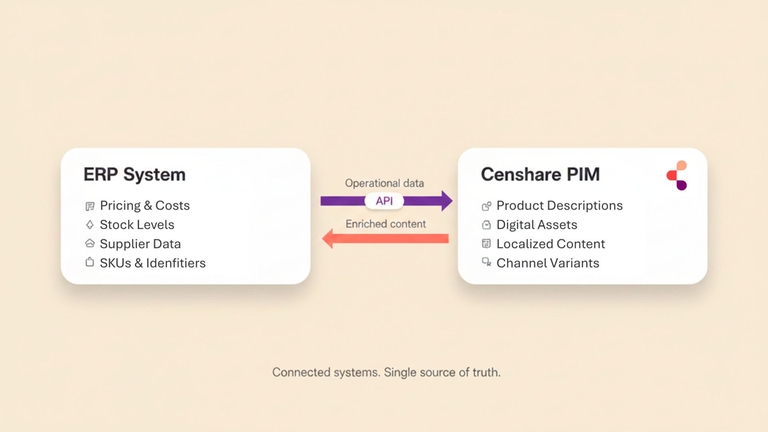
PIM ERP integration is the process of connecting these two platforms so that product data flows between them without manual re-entry. When a new item is created in the ERP, the PIM receives it. When enriched content is finalized in the PIM, downstream channels get updated. The result is a single connected workflow rather than two separate data silos.
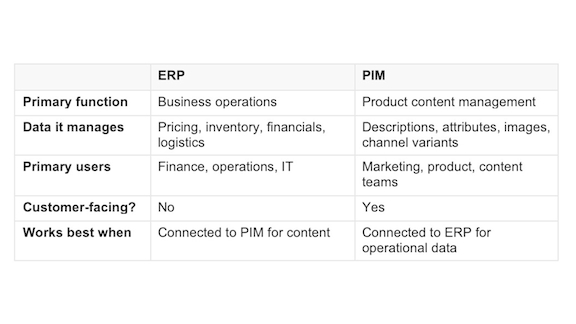
This isn't the same as replacing one system with the other. ERP systems manage operational data: financials, inventory, pricing, procurement, and logistics. PIM software manages product content: names, descriptions, attributes, media, and channel-specific variants. They serve different purposes, and connecting them makes both more effective.
PIM vs. ERP: What's the Difference?
ERP and PIM are often mentioned in the same breath, but they solve different problems.
An ERP (Enterprise Resource Planning) system is the operational backbone of a business. It manages financials, inventory, procurement, order management, and logistics. When a product is purchased, priced, or shipped, that data lives in the ERP. It's built for internal business processes.
A PIM (Product Information Management) system manages what customers actually see. Product names, descriptions, specifications, digital assets, channel-specific content, and localized variants all live in the PIM. It's built for external-facing product content — the information that drives purchase decisions across ecommerce, print, retail, and wholesale channels.
The clearest way to think about the distinction: the ERP knows that SKU 10042 exists, costs €49.99, and has 200 units in stock. The PIM knows what SKU 10042 is called, what it does, what it looks like, and how to describe it to a customer in German, French, or English.
Neither system replaces the other. ERP without PIM means operational data with no content layer. PIM without ERP means rich content with no connection to the business data that drives it. Integration is what makes both work together.
Benefits of Integrating PIM with ERP Systems
The case for integration comes down to a few concrete improvements that affect speed, accuracy, and operational cost.
Faster product launches.
When a new SKU is created in the ERP, integration pushes it automatically into the PIM for enrichment. Teams don't wait for someone to export a spreadsheet, share it, and re-import it manually. The product is ready to enrich as soon as it exists.
Fewer data errors.
Manual re-entry between systems introduces inconsistencies. A price change in the ERP that doesn't make it into the PIM creates mismatches across channels. Integration eliminates that risk by making the ERP the authoritative source for operational data and the PIM the authoritative source for content.
Reduced operational overhead.
Teams spend less time on data maintenance and more time on value-adding work. Imports, exports, and cross-system checks are replaced by automated sync.
Automated product data synchronization.
Once PIM and ERP are connected, data sync runs without manual intervention. New SKUs created in the ERP appear in the PIM automatically; enriched content in the PIM pushes to downstream channels on a schedule or in real time. This removes a category of manual work entirely and reduces the risk of data falling out of sync between systems.
Better channel readiness.
When ERP and PIM are connected, enriched and approved product content is always tied to live operational data. Products reach ecommerce, print, retail, and wholesale channels with consistent, accurate information. That's where PIM syndication comes in — ensuring that content reaches every channel in the right format, automatically.
Improved compliance and auditability.
A connected system creates a clear record of where data originated and when it changed. For regulated industries, this traceability matters.
Common Data Flows Between PIM and ERP
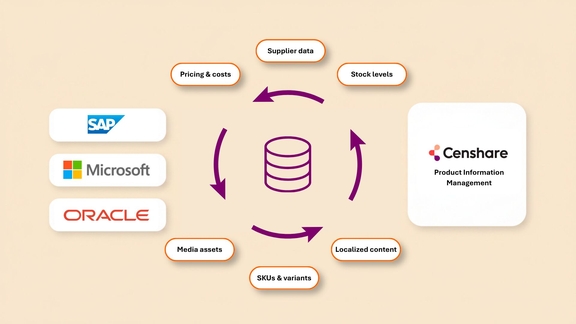
Integration between PIM and ERP is bidirectional, but the two directions carry different types of data.
ERP → PIM (operational data flowing into content management):
PIM → ERP (enriched content flowing back or to downstream channels):
Finalized product names and descriptions
Approved digital assets and media references
Channel-specific content variants
Translation and localization status
Publication-ready product data packages
Not all integrations use both directions equally. Some businesses use the ERP as a one-way source of truth for product creation, with the PIM operating independently once it receives the initial data. Others maintain ongoing sync in both directions. The right model depends on how your teams work and where each type of data is managed.
Decision Framework: One-Way vs. Two-Way Sync
One of the earliest decisions in any integration project is whether to sync data in one direction or both. This choice has significant implications for governance, complexity, and ongoing maintenance.
One-Way Sync: ERP → PIM (Most Common)
Choose this when:
Your ERP is the single source of truth for product identifiers, pricing, and inventory
Your PIM team enriches and manages content independently after receiving the initial product data
You want to minimize complexity and cross-system dependencies
Your PIM doesn't need to push data back to the ERP
Governance model: ERP owns product identifiers and pricing. PIM owns all content. A price change in the ERP automatically updates the PIM; content changes in the PIM don't affect the ERP.
Complexity: Low to moderate. Simpler to manage because there's one authoritative source for each data type.
Two-Way Sync: ERP ↔ PIM (Higher Complexity)
Choose this when:
You need real-time inventory updates from ERP to customer-facing channels via PIM
The PIM publishes product data that the ERP needs to reference
You have a distributed team where changes happen in both systems simultaneously
Governance model: Both systems are authoritative for different types of data. Conflicts are resolved by pre-defined rules.
Complexity: Moderate to high. Requires clear conflict resolution rules and more sophisticated monitoring.
How to Decide
Ask: Do you need real-time data from ERP flowing to customer channels via PIM?
Yes, and the PIM also publishes data the ERP needs → Two-way sync
Yes, but only ERP data needs to flow to PIM → One-way sync (ERP → PIM)
No → One-way or batch sync is sufficient
How to Connect a PIM to an Existing ERP System
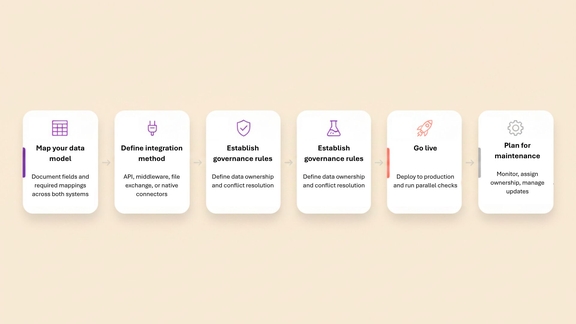
Connecting a PIM to an existing ERP is a project that touches both systems, both teams, and the integration layer between them. Here's how to approach it.
1. Map your data model.
Before any technical work begins, document what data lives in each system and what needs to move between them. Create a field mapping document showing:
Field names in both systems (e.g., "article number" in ERP vs. "product ID" in PIM)
Data types (text, number, date, list)
Required vs. optional fields
Transformation rules (does a price in ERP need to be adjusted before it reaches the PIM?)
Frequency (real-time vs. batch)
Data types (text, number, date, list)
2. Define the integration method.
The main options are:
Direct API integration — PIM and ERP communicate in real time via APIs. Best for systems that support it and where low latency matters.
Middleware / iPaaS — A platform like MuleSoft or Boomi sits between the two systems, handling transformation and routing. Good for complex environments with multiple systems.
File-based exchange — Scheduled exports and imports via CSV, XML, or JSON. Simpler to set up but less responsive.
Native connectors — Some PIM platforms offer pre-built connectors for common ERP systems (SAP, Oracle, Microsoft Dynamics). These reduce implementation time significantly.
3. Establish governance rules.
Decide which system owns which data. The ERP is typically authoritative for pricing, inventory, and identifiers. The PIM owns content. Define what happens when a conflict occurs, and document these rules so both the ERP team and PIM team have visibility.
4. Build and test in a staging environment.
Never test integration logic directly in production. Run the integration against real data volumes before going live. Test edge cases: products with missing fields, SKUs that exist in one system but not the other, large batch imports. Run at least two full cycles — the first to fix mapping issues, the second to test failure scenarios.
5. Go live.
Once testing is complete and stakeholders have signed off, deploy the integration to production. Run a parallel check in the first days after go-live to confirm data is flowing correctly and no records are being dropped or overwritten. Start the integration at a low-traffic time so you have capacity to respond to issues.
6. Plan for ongoing maintenance.
Integrations break when either system changes — a schema update, a new field, a version upgrade. Build in monitoring, assign clear ownership for integration health, keep field mappings and governance rules documented, and test vendor updates in staging before applying them to production.
When both systems are cloud-based, integration follows the same principles but with a few additional considerations. Cloud PIM and cloud ERP communicate via REST APIs, which means connectivity is typically faster to set up than on-premise integrations — but also means you're dependent on both vendors' API availability and rate limits. For large catalogs, batch sync windows and throttling limits need to be factored into your integration design from the start.
Challenges to Expect When Linking PIM to ERP
Integration projects surface problems that were previously invisible. That's not a reason to avoid them — it's a reason to plan carefully.
Challenge 1: Data Quality Issues Become Visible Immediately
When two systems start exchanging data, inconsistencies that were silently tolerated suddenly matter. Duplicate SKUs, missing required fields, and non-standard attribute values all need to be resolved before integration can run cleanly.
Warning signs:
The integration rejects 5–10% of records with validation errors during testing
Your ERP has products with blank required fields that the PIM requires
The same product exists under two different SKUs in the ERP
How to mitigate:
Run a pre-integration data audit 3–4 weeks before go-live. Assign a cleanup task force to fix high-impact issues. Create a data validation rule that defines what "clean" data looks like and rejects records that don't meet the standard.
Challenge 2: Field Mapping Is Rarely Straightforward
ERP systems and PIM platforms use different data models, different terminology, and sometimes different units or formats. Mapping every relevant field correctly takes time and domain knowledge.
Warning signs:
You can't find a 1:1 field mapping — systems calculate or name the same concept differently
Units don't match (ERP stores dimensions in inches; PIM uses centimetres)
One system uses a hierarchical structure; the other is flat
How to mitigate:
Create a detailed mapping document early. Write transformation rules for complex fields. Involve both system experts — the person who knows the ERP data structure and the person who knows the PIM content model — and test mappings with real data before go-live.
Challenge 3: Organizational Alignment Is as Hard as the Technical Work
ERP is typically owned by IT or finance. PIM is owned by marketing or product content teams. Integration requires both groups to agree on data ownership, sync frequency, and exception handling. This is often where projects stall.
The ERP team went live with the integration before the content team was ready
A conflict arises and there's no agreed rule for who decides
How to mitigate:
Hold a governance workshop early in the project with both teams. Document and get sign-off on data ownership rules, sync frequency, and conflict resolution. Form a steering committee that meets monthly after go-live.
Challenge 4: Version Updates Can Break Integrations
When the ERP vendor releases an update, APIs may change. A field that was required becomes optional. An endpoint is deprecated. Ongoing integration maintenance requires monitoring and ownership — it's not a one-time project.
How to mitigate:
Version-lock your integration. Subscribe to vendor release notes. Set up automated smoke tests that run daily. Assign clear ownership for managing vendor updates.
Challenge 5: Cloud-Based PIM and ERP Introduce Latency Considerations
When both systems are cloud-hosted, API rate limits, connection timeouts, and data volume constraints become design factors, especially for large product catalogs.
How to mitigate:
Design for throttling — use batch windows with exponential backoff if you hit rate limits. Chunk large imports rather than syncing everything at once. Monitor API usage and plan for async operations rather than waiting for syncs to complete in real time.
Best Practices for Integrating PIM and ERP Systems
Start with a data audit. Before integrating, clean the data in both systems. Garbage in, garbage out applies especially to integration — errors replicate automatically.
Define clear data ownership up front. Every field should have a single system of record. Ambiguity leads to conflicts and overwriting.
Use a staging environment. Never test integration logic directly in production. A dedicated staging environment lets you validate mappings, test edge cases, and catch failures before they affect live data.
Automate monitoring. Set up alerts for failed syncs, missing records, and data anomalies. Silent failures are worse than noisy ones.
Document everything. Field mappings, governance rules, sync schedules, exception handling — all of it should be written down and version-controlled. When team members change or systems update, this documentation becomes critical.
Involve both system owners from the start. Integration projects that start as IT projects and involve content or marketing teams late tend to produce systems that work technically but don't fit how people actually work. Bring both sides in at the design stage.
Plan for scale . If your product catalog is growing, design the integration to handle 10x your current volume. Re-architecting an integration under load is expensive.
Integration Readiness Checklist
Use this checklist 4–6 weeks before your planned go-live date.
Pre-Project Phase (6–8 weeks before)
Stakeholder alignment:
Governance workshop held with ERP team and PIM team
Data ownership defined and documented for each field
Sync frequency agreed (real-time, daily, weekly)
Conflict resolution rules documented and signed off
Runbooks written (launch, monitoring, troubleshooting)
Pre-Launch Phase (2–4 weeks before)
Integration deployed to production
Initial test run completed (create product in ERP, verify in PIM)
Dashboard monitoring activated
On-call team standing by for 24–48 hours
Post-Launch (Weeks 1–4)
Daily health check: sync success rate, error count, data anomalies
Weekly spot-check: verify ERP data matches PIM data for 50 records
Monthly steering committee meeting held
Vendor updates tested in staging before production deployment
Key Features to Look for in a PIM-ERP Integration Solution
Not all PIM platforms offer the same integration capabilities. When evaluating options, look for:
Pre-built ERP connectors.
Native connectors for SAP, Oracle, Microsoft Dynamics, or your specific ERP reduce implementation time and ongoing maintenance burden compared to custom-built integrations.
Flexible data mapping tools.
The ability to map, transform, and validate fields between systems without heavy developer involvement makes integration more maintainable over time.
Bidirectional sync support.
Some platforms only support one-way data import. If you need data to flow in both directions, confirm this is supported before committing.
Real-time and scheduled sync options.
Depending on your use case, you may need near-real-time updates (for ecommerce pricing) or scheduled batch sync (for overnight catalog updates). A good solution supports both.
Error handling and logging.
When a sync fails, the system should tell you what failed, why, and what action is needed. Opaque error handling makes integration maintenance painful.
Scalability.
The integration layer should handle large batch imports and high-frequency updates without degrading performance.
API-first architecture.
A PIM built on open APIs is easier to integrate with existing ERP systems and future tools. Proprietary, closed architectures create long-term lock-in.
How to Choose an Integration Partner for PIM and ERP
For most mid-market and enterprise businesses, PIM-ERP integration is not a project to do alone. Choosing the right implementation partner significantly affects how quickly the integration goes live and how well it performs over time.
Look for experience with both systems. A partner who knows PIM but has never worked with your ERP will face a learning curve on your project. Ask specifically about past integrations involving your ERP platform and request references from similar implementations.
Ask about data migration experience. Integration projects often uncover data quality issues that require migration and cleanup work. Ask: Have you done data cleanup for this ERP before? What's your typical data quality discovery process?
Evaluate their ongoing support model. Integrations need maintenance. Understand what the partner offers after go-live: monitoring, support SLAs, and how they handle system updates from either vendor.
Check references from similar implementations. AAsk for references from companies with similar catalog sizes, ERP platforms, and integration complexity. Talk to the references directly.
Clarify ownership of integration documentation. When the project ends, you should have full documentation of the integration architecture, field mappings, and governance rules — not a dependency on the partner to explain how it works.
Censhare and PIM-ERP Integration
Censhare's PIM software is built on an open, API-first architecture that supports integration with ERP platforms and broader commerce and operations ecosystems. Rather than locking product data inside a closed system, Censhare is designed to connect — pulling in operational data from ERP systems and pushing enriched, channel-ready product content out to wherever it needs to go.
For organizations managing complex product catalogs across multiple markets, languages, and channels, that connectivity is what allows PIM to do its job. Content that can't connect to the systems that create and distribute products creates manual work and data silos. Censhare is built to eliminate both.
Frequently Asked Questions
What is a PIM in ERP?
PIM is not a component of ERP — it's a separate system. ERP (Enterprise Resource Planning) manages operational data like pricing, inventory, and financials. PIM (Product Information Management) manages product content: names, descriptions, attributes, and digital assets. The two are often integrated so that product identifiers and pricing from the ERP flow into the PIM, and enriched content from the PIM flows to customer-facing channels.
What is the difference between ERP and PIM?
ERP systems are built to manage business operations: procurement, inventory, finance, and order management. PIM systems are built to manage product content: the information customers see when they shop, including descriptions, specifications, images, and channel-specific variants. They serve different functions and are most effective when integrated rather than treated as alternatives.
Is PIM part of ERP?
No. PIM and ERP are distinct systems that address different business needs. Some ERP vendors offer basic product data functionality, but it typically lacks the content management depth, localization support, and channel publishing capabilities of a dedicated PIM. Most organizations that need both end up running them as separate, integrated platforms.
Is PIM the same as ERP?
No. While both manage business-critical data, they manage different types. ERP handles operational and financial data; PIM handles product content and channel-specific information. They work best together, with integration ensuring that data created in one system is available in the other without manual transfer.
Does SAP have a PIM?
SAP offers product data management capabilities through SAP Master Data Governance (MDG), but this is not the same as a dedicated PIM system. SAP MDG provides governance and consolidation of master data across SAP landscapes — it's less suited to organizations seeking a channel-publishing-focused PIM with rich content enrichment, localization, and digital asset management capabilities. Organizations using SAP as their ERP often implement a standalone PIM alongside it for these reasons.
What is PIM in SAP?
In the context of SAP, "PIM" usually refers to product data managed within SAP's ecosystem — either in the core ERP, SAP MDM, or SAP Product Content Hub. However, many businesses integrate a dedicated external PIM with SAP to handle richer content requirements that SAP's native tools don't fully support.
Can a PIM replace an ERP?
No. A PIM manages product content; it does not handle financials, inventory, order management, or procurement. These are core ERP functions. The two systems serve complementary roles and are designed to be used together, not as substitutes.
How do cloud-based PIM systems integrate with ERP platforms?
Cloud-based PIM and ERP systems communicate via REST APIs, which typically means faster connectivity setup and real-time data flow. However, both vendors throttle API requests, so your integration needs to respect rate limits — especially for large catalogs. Cloud integrations commonly use direct API calls for simple setups, middleware platforms for complex transformations, or scheduled batch sync for large catalogs where real-time isn't required.
What challenges should I expect when linking PIM to ERP?
The most common challenges are: data quality issues (duplicates, missing required fields, inconsistent formatting); field mapping complexity (different systems use different terminology and structures); organizational misalignment between ERP and PIM teams on governance; vendor updates breaking integrations; and cloud API rate limits causing latency for large catalogs. See the Challenges section for detailed mitigation strategies.
How much does it cost to implement a PIM and ERP integration?
Costs vary significantly based on your ERP platform, catalog size, existing data quality, integration scope (one-way vs. two-way, real-time vs. batch), and whether you use a pre-built connector or custom integration. For a realistic estimate, work with your chosen integration partner — they'll assess your specific situation and provide a time and cost estimate based on your actual requirements.
Chris Leaman
Chris Leaman has over ten years’ experience working as a Solution Architect on Business Process Management, Marketing Resource Management, Digital Asset Management, Web/Content Management and Marketing Automation applications in a client-facing role. Before joining Emmsphere Plus, he managed the DAM at a large retailer and assisted in the transition to a new system.